
Levelling Up with Cursor: How I Turned AI into a Learning Partner
One of the biggest challenges for me wasn’t just picking up a new language or framework, it was figuring out how to learn effectively while still getting work done. That's where Cursor came in...


Heya friends 👋🏾, I’m Muher, a developer on the Payroll team here at Jane. Most of my career so far has been frontend-focused, but since joining Jane I’ve been stepping into full-stack territory which meant learning Rails and Ruby from scratch.
One of the biggest challenges for me wasn’t just picking up a new language or framework (I’ve done that many times for personal projects), it was figuring out how to learn effectively while still getting work done. That’s where Cursor came in, and honestly, it has changed the way I approach learning as a developer.
Keeping Up in a Fast-Moving World
As devs we’re constantly juggling new technologies, frameworks, and libraries. Best practices evolve constantly and are often subjective. Sometimes, it feels like you’re just trying to keep your head above the water. As much as I love learning, we only have so much time in a day.
Before I started using Cursor, my workflow looked something like this:
- Reference existing code (internal repos or an open-source example)
- Read official docs and our internal knowledge base
- Ping my teammates for help or pairing sessions
- Google and check StackOverFlow for alternatives
When Claude and similar tools became popular, I tried them too. They were great for validating ideas, planning, and brainstorming alternatives and edge cases. But there was a problem: without full context of my code or project, suggestions were often generic and didn’t really fit. It was more like pairing with a smart but forgetful teammate.
Discovering the Power of Cursor
When Jane got licenses for Cursor, I didn’t immediately jump on it. Honestly, like many other developers at the time, I didn’t see the need to switch to a new IDE. I also didn’t fully understand how much AI could level up my day-to-day tasks. I had tried Copilot on VS Code. It was somewhat helpful, but it made a lot of mistakes, so I ended up using it mostly for writing tests.
What really opened my eyes was when I took the time to learn more about what Cursor can do during a Lunch and Learn. It lets you switch between different models, including my favourite at the time, Claude Sonnet 3.7. More notably, it can ingest a lot of context like your codebase, workflows, and rules. That’s when I started to see its potential, not just for getting work done, but for learning intentionally.
As someone with mostly frontend experience, jumping into backend at work felt intimidating. I started with the basics: reading Rails docs, completing Ruby Koans, and building a small app with a database. I also leaned on existing code at Jane to get a sense of common patterns.
Still, I had a big question hanging over me: am I actually doing this the “right” way?
Backend development with Ruby and Rails comes with many patterns and conventions that aren’t always obvious. Normally, you pick these up through experience, which I didn’t have, or guided mentorship, which isn’t always easy to come by. That’s where Cursor rules really changed the game for me.
Rules That Turn AI into a Teacher
Here are some of the rules I set up to make Cursor a proper learning partner:
- When analyzing or suggesting Ruby and Rails code, always break it down line by line and explain every step.
- Give alternatives for every suggested solution and list clear tradeoffs.
- Help analyze and discover opportunities to improve my code.
- Catch and point out redundancy when possible.
- Double-check all solutions and answers at least twice.
- Ask for more context if it’s needed to give better solutions.
It might sound like a lot of overhead, but the results were immediate. Instead of just copying code or blindly following examples, I was thinking critically about each decision. I could spot logical flaws, challenge suggestions, and really understand tradeoffs.
It felt like pairing with a more experienced developer. Someone who sometimes makes mistakes, but whose reasoning you can learn from. It was surprisingly human!
Seeing It in Action
Examples go a long way so here are some simple snippets of the rules in action for both frontend and backend code:
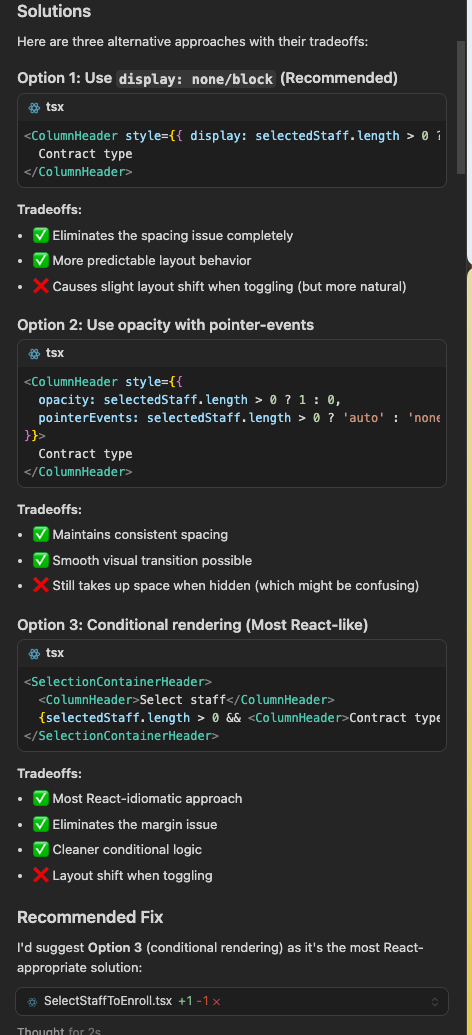
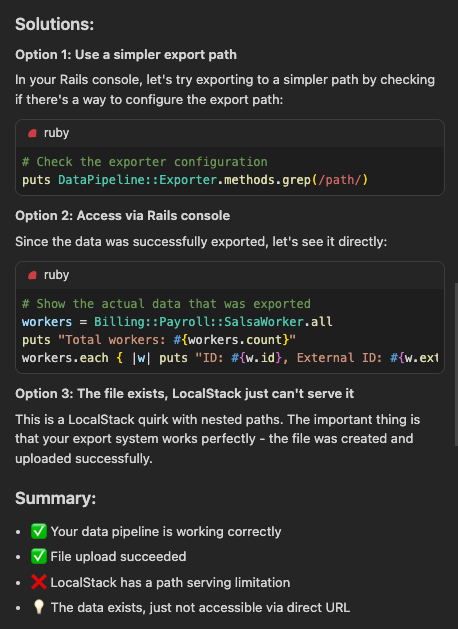
Cursor does this for every code suggestion it gives me, I never have to prompt it to do so thanks to the rules. It helps me think through options and get into the mindset of considering edge cases.
This type of feedback loop of getting multiple suggestions with tradeoffs and explanation of code changes helps me challenge the agent and have followup discussions that truly help me level up.
Next Steps: Levelling Up Further
I see a lot of potential to take this further:
- Shared rule sets: create a team-wide library of Cursor rules aligned with our conventions and best practices (something that is already in the works here at Jane).
- Test and security prompts: automatically include test ideas or security checks with suggestions.
- Pairing review sessions: use Cursor for code reviews, focused on learning changes made by other developers on top of reviewing for any issues or missed edge cases.
Takeaways
Using Cursor this way has changed how I learn. I’m more confident in backend development and as a full-stack developer now. I’m not using AI to do work for me, but to learn intentionally. I get reasoning, alternatives, and context for every suggestion it makes. I challenge the AI, which forces me to think critically about my decisions.
Cursor isn’t replacing developers. It’s giving me a way to learn faster, with more depth, and with guidance I wouldn’t otherwise have. It makes learning more enjoyable and engaging, and it promotes continuous learning.
Closing Thoughts
If you’re trying to learn a new framework or language while still shipping features, I’d recommend trying a rules-based approach with Cursor. Define your learning rules, push back on suggestions, and treat AI as a learning partner, not a code generator.
I’d love to hear how you’re using AI to learn. Share your approaches in the comments or reach out! I’m always curious about how people are levelling up! 😃